
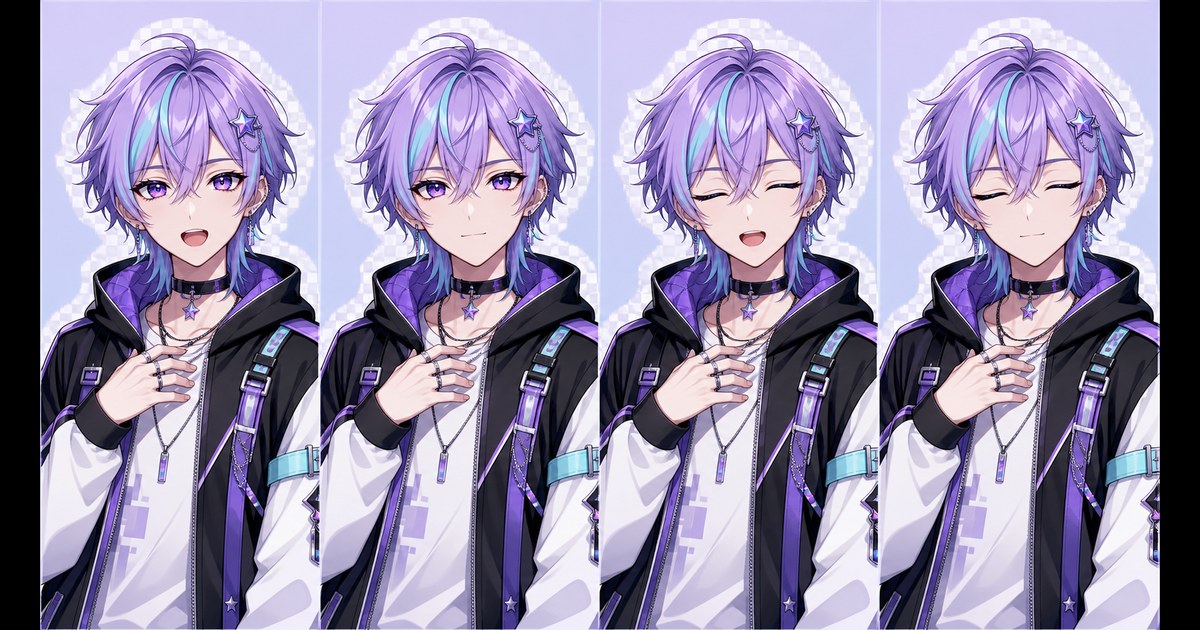
A good PNGTuber model is not simply four similar drawings. It is a controlled expression sheet in which the character, pose and framing stay fixed while the eyes and mouth change in predictable states. That stability is what makes a reactive avatar feel like one person speaking instead of four images popping between unrelated poses.
This guide explains the four essential states, how to choose a readable PNGTuber pose, and what to include when drawing the model yourself or briefing a PNGTuber commission artist. If you want to build the basic set automatically, start with the free four-image PNGTuber Maker.
What is a PNGTuber model?
A PNGTuber model is a group of transparent character images used by reactive avatar software. The software listens to microphone activity and switches between a quiet image and a talking image. Blinking states can be added so the avatar feels less static.
Unlike a rigged VTuber model, a basic PNGTuber does not need bones, mesh deformation or face tracking. The movement comes from switching complete PNG images. That makes the model easier to prepare, but it also makes consistency between images especially important.
If this is your first model, read what a PNGTuber is and how to make one free before choosing software.
The four essential PNGTuber expression states
A practical four-image expression sheet covers two variables: whether the eyes are open or closed, and whether the mouth is open or closed.
| State | Eyes | Mouth | Typical use |
|---|---|---|---|
| A | Open | Open | Talking |
| B | Open | Closed | Quiet or idle |
| C | Closed | Open | Talking during a blink |
| D | Closed | Closed | Quiet during a blink |
The online PNGTuber model maker creates and labels this A/B/C/D structure automatically. You can also use the table as a checklist for hand-drawn art.
Why the pose should stay consistent
When the microphone crosses its activation threshold, the runtime may switch images several times during one sentence. Any change outside the eyes and mouth becomes repeated motion:
- a hand jumps to a different position;
- the shoulders change angle;
- the head becomes larger or smaller;
- hair accessories move between sides;
- the crop shifts vertically;
- the lighting or palette changes.
Small expression changes feel lively. Large pose changes feel like a cut. For the main speaking set, lock the silhouette, costume, accessories, camera angle, crop and canvas dimensions. Change only what the state requires.
How to choose a readable PNGTuber pose
Start with a clear silhouette
The character must remain readable over a game, chat window or stream overlay. Keep the face unobstructed and avoid placing both hands directly over the mouth area.
Use restrained asymmetry
A slight head tilt, one raised hand or an angled shoulder can give the model personality. The pose should still be easy to reproduce exactly across every state. Complex crossed fingers, moving props and dramatically foreshortened arms increase the chance of visible inconsistencies.
Choose the crop for the final scene
A bust or half-body model usually remains readable at smaller stream sizes. A full-body pose provides more costume detail but needs more screen space. Decide the crop before drawing the expression variants, then keep identical transparent padding around all four PNGs.
Match the pose to the channel tone
- Cozy streams: relaxed shoulders and a soft smile.
- Gaming: an energetic but repeatable hand gesture.
- Commentary: a direct front-facing pose with a clear mouth.
- Horror or mystery: controlled posture and stronger shadow shapes without hiding the eyes.
The Maker includes a separate pose-and-emotion field so you can describe this direction without mixing it into the character identity prompt.
Do you need more than four expressions?
No. Four states are enough for a complete talking, quiet and blinking loop. Additional emotional poses are optional.
You might later prepare happy, angry, surprised, sad or shocked versions for scene changes and manual reactions. Keep each emotional set internally consistent. Do not replace the normal talking image with a radically different full-body pose unless you intentionally want a scene change.
How extra expressions are selected depends on the runtime. Compare Veadotube Mini and PNGTuber Plus before building a large layered or hotkey-driven model.
PNGTuber commission brief checklist
If you hire an artist, provide a functional brief rather than asking only for “a PNGTuber model.” Confirm the artist’s terms, allowed uses and commercial rights directly with them. Use the complete PNGTuber commission guide and copyable artist brief to define files, revisions, delivery and written usage terms.
- character reference and color palette;
- final platform and intended display size;
- bust, half-body or full-body crop;
- exact pose and hand placement;
- A/B/C/D eye and mouth state list;
- identical canvas dimensions and transparent padding;
- transparent PNG delivery;
- file naming convention;
- optional emotional expressions;
- usage, credit, revision and commercial-rights terms.
You can generate a temporary four-state set with the free PNGTuber Maker to demonstrate the required state logic before commissioning a fully custom illustration.
Expression sheet quality checklist
- Exactly the intended eye and mouth combination appears in each state.
- The face, hair, costume and accessories remain the same.
- The body pose and hands do not jump.
- All canvases use identical pixel dimensions.
- The character occupies the same position and scale.
- The background is genuinely transparent.
- No state clips hair, props or sleeves.
- Every file remains readable at the final stream size.
Turn the expression sheet into a reactive avatar
Once the four states pass the checklist, import them into your runtime. The Maker also creates a ready-to-import .veadomini project. Follow the Veadotube Mini setup guide, then use the OBS capture guide to place the transparent avatar in a scene.
Create the four states
Describe the character, choose a visual style, set the pose and download the transparent A/B/C/D PNGs plus the Veadotube Mini pack.
Keep the finished state set manageable
After the core sheet works, decide whether four PNGTuber states are enough. When the set starts growing, use a stable file naming and folder system so the runtime always points to the intended release.
Frequently asked questions
How many images does a PNGTuber model need?
Two images can provide a basic quiet-and-talking switch. Four images add open-eye and closed-eye versions for a more complete blinking loop.
What is a PNGTuber expression sheet?
It is a set of character images showing the eye, mouth and optional emotional states required by reactive avatar software. The design, pose, framing and canvas should stay consistent across the sheet.
Should every PNGTuber pose be different?
No. The core talking and blinking states should share one pose. Additional poses are best treated as optional emotional or scene variants.
Can I draw the states myself?
Yes. Draw one master image, duplicate the canvas, and edit only the eyes and mouth for the other core states. Keep layer placement and transparent padding unchanged.
Can I use the Maker as a commission reference?
Yes. A generated test set can demonstrate state order, crop and pose direction. A commissioned artist’s own terms determine how their final artwork may be used.