
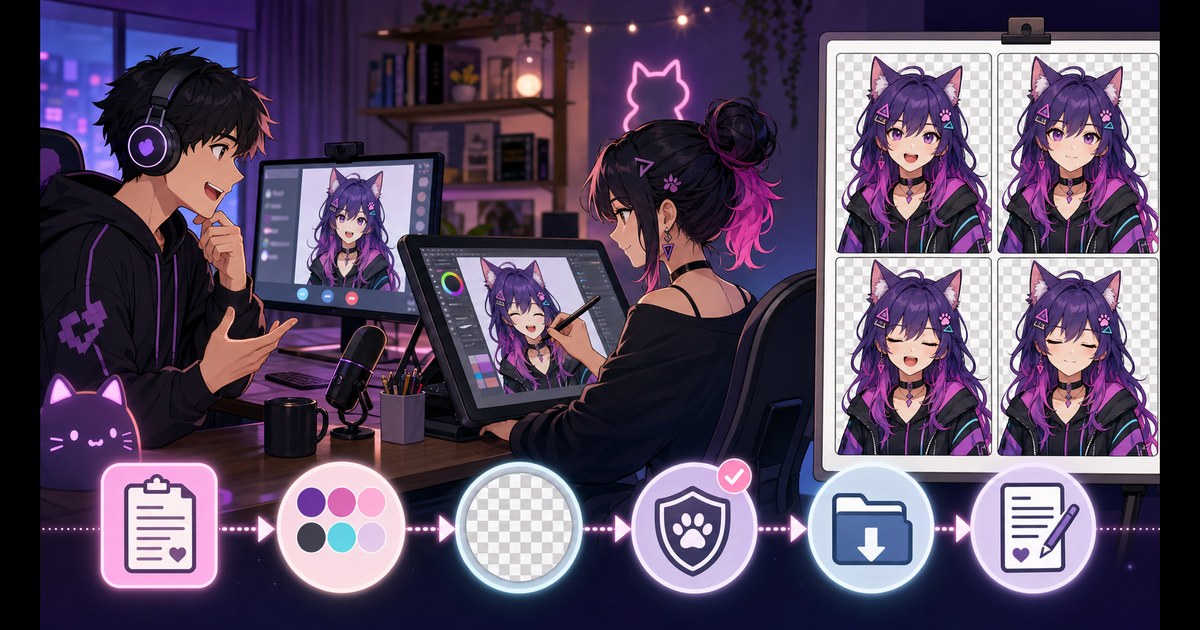
A PNGTuber commission can produce a character tailored to your channel, but “PNGTuber model” does not describe one universal deliverable. One artist may include two finished PNGs, another may deliver four blinking states, and another may prepare layered files for animation software. The safest approach is to define the files, states, revisions and usage terms before payment.
This guide gives you a practical PNGTuber commission checklist and a copyable artist brief. If you are still testing the concept, create a temporary prototype with the free PNGTuber Maker before ordering custom artwork.
Decide what kind of PNGTuber model you need
Start with the software and stream layout, not the illustration style. Your runtime determines how the artwork must be prepared.
Complete-image model
A complete-image model uses finished transparent PNG files. The software swaps the entire character when you speak or blink. This is the simplest format for Veadotube Mini and similar reactive-image workflows.
Layered model
A layered model separates the head, body, eyes, mouth, hair or accessories so software can apply bounce and secondary movement. It requires more preparation and should not be ordered as if it were the same product as four flattened PNGs.
Compare Veadotube Mini and PNGTuber Plus before asking an artist to separate layers.
Minimum PNGTuber commission deliverables
For a complete four-state model, request:
- A: eyes open, mouth open;
- B: eyes open, mouth closed;
- C: eyes closed, mouth open;
- D: eyes closed, mouth closed;
- transparent PNG files;
- identical canvas dimensions;
- identical pose, crop, scale and transparent padding;
- a clear file naming convention;
- the agreed resolution;
- any source or layered files explicitly included in the quote.
Use the PNGTuber poses and expression sheet guide for a visual explanation of the A/B/C/D structure.
What to include in the character brief
Identity and visual direction
- age presentation and general character energy;
- hair, eye and skin colors;
- clothing silhouette and important accessories;
- species traits such as ears, horns or tail;
- color palette;
- art-style references used as direction rather than work to copy;
- elements that must not appear.
Pose, expression and crop
- bust, half-body or full-body framing;
- head angle and shoulder direction;
- exact hand placement;
- default emotional tone;
- mouth shape for talking;
- blink style;
- optional happy, angry, surprised or sad variants.
A pose that is simple to reproduce across four states usually reacts more cleanly than a dramatic gesture with moving hands and props. The four-state Maker can help you test a pose direction before sending the brief.
Questions to ask before paying
- How many finished states are included?
- Are revisions included, and at which stages?
- Are layered or source files included?
- What canvas size and file format will be delivered?
- Is the background transparent?
- Can the artwork be used on a monetized stream?
- Can it be used in videos, thumbnails and social posts?
- Can it be edited or animated later?
- Is artist credit required?
- Are merchandise uses included or priced separately?
- Can either party resell or redistribute the files?
- What happens if the project is cancelled?
Usage rights: never rely on assumptions
Paying for artwork does not tell you, by itself, which uses the artist has agreed to. Ask for written terms covering the uses that matter to you. Copyright, work-for-hire rules and contract requirements vary by jurisdiction.
This article is a practical production checklist, not legal advice. For general copyright information, consult the World Intellectual Property Organization copyright overview. United States readers can also review the U.S. Copyright Office circular on works made for hire. For a significant commercial project, obtain advice appropriate to your country and agreement.
A sensible commission workflow
- Written brief: agree on model format, states, pose, crop and usage.
- Quote and schedule: confirm price, payment stages and expected review dates.
- Sketch approval: validate silhouette, pose and crop before rendering.
- Color approval: verify palette, costume details and readability.
- Expression proof: review all eye and mouth combinations together.
- Transparent-file QA: inspect dimensions, padding, edges and filenames.
- Runtime test: load the states into the intended PNGTuber software.
- Final delivery: archive files, terms, invoice and artist contact information.
Whenever possible, use a commissioning platform or payment method with a documented transaction and dispute process. Do not pressure an artist to start before scope, payment and terms are clear.
Copyable PNGTuber commission brief template
PROJECT
Custom PNGTuber model for: [platform/channel]
Runtime: [Veadotube Mini / PNGTuber Plus / other]
Target date: [date]

CHARACTER
Concept: [short description]
Personality: [traits]
Palette: [colors]
Hair / eyes / outfit: [details]
Accessories: [details]
Do not include: [exclusions]
Reference links: [links]

FORMAT
Framing: [bust / half body / full body]
Pose: [exact pose and hands]
Canvas size: [pixels]
Background: transparent
File format: PNG
Layered/source files required: [yes/no and format]

CORE STATES
A — eyes open, mouth open
B — eyes open, mouth closed
C — eyes closed, mouth open
D — eyes closed, mouth closed
Extra emotions: [list or none]

DELIVERY
Naming convention: [example]
Revisions included: [number/stages]
Credit wording: [exact wording]
Approved uses: [stream/video/social/merch/etc.]
Editing or future animation: [allowed/not allowed]
Other terms: [details]
How to review the delivered PNGTuber model
Place all states side by side at the same zoom. Check:
- hair, face, costume and accessories remain consistent;
- hands and shoulders do not jump;
- all canvases have the same dimensions;
- the character occupies the same coordinates;
- eyes and mouth match the requested state;
- transparent edges are clean;
- no accidental background pixels remain;
- small details remain readable at stream size.
Then test the model with real microphone input. Follow the Veadotube Mini setup guide and the OBS PNGTuber guide.
Prototype before commissioning
A prototype helps you discover whether the crop is too wide, the pose hides the face or the character is unreadable in your overlay. It also gives the artist a functional state reference without asking them to copy generated artwork.
Test your four-state brief
Generate a temporary A/B/C/D set, check it in your layout and refine the pose before ordering final custom art.
Frequently asked questions
How much does a PNGTuber commission cost?
There is no reliable universal price. Cost depends on the artist, complexity, number of states, layers, revisions, deadline and usage rights. Compare the complete scope rather than the headline price alone.
How many states should I commission?
Two states cover basic quiet and talking reactions. Four states add talking and quiet blink variants. Extra emotions and layered animation are optional additions.
Do I automatically receive commercial rights?
Do not assume so. Ask the artist to state the approved uses in writing. Laws and contract rules vary by jurisdiction.
Should the artist provide source files?
Only if source or layered files are included in the agreed scope. Finished transparent PNGs and editable source files are different deliverables.
Can I use an AI prototype in an artist brief?
You can use a prototype to demonstrate state logic, crop and general direction. Tell the artist how the reference was made, avoid requesting copies of protected characters or another artist’s style, and let the commissioned artist create an original final design.