
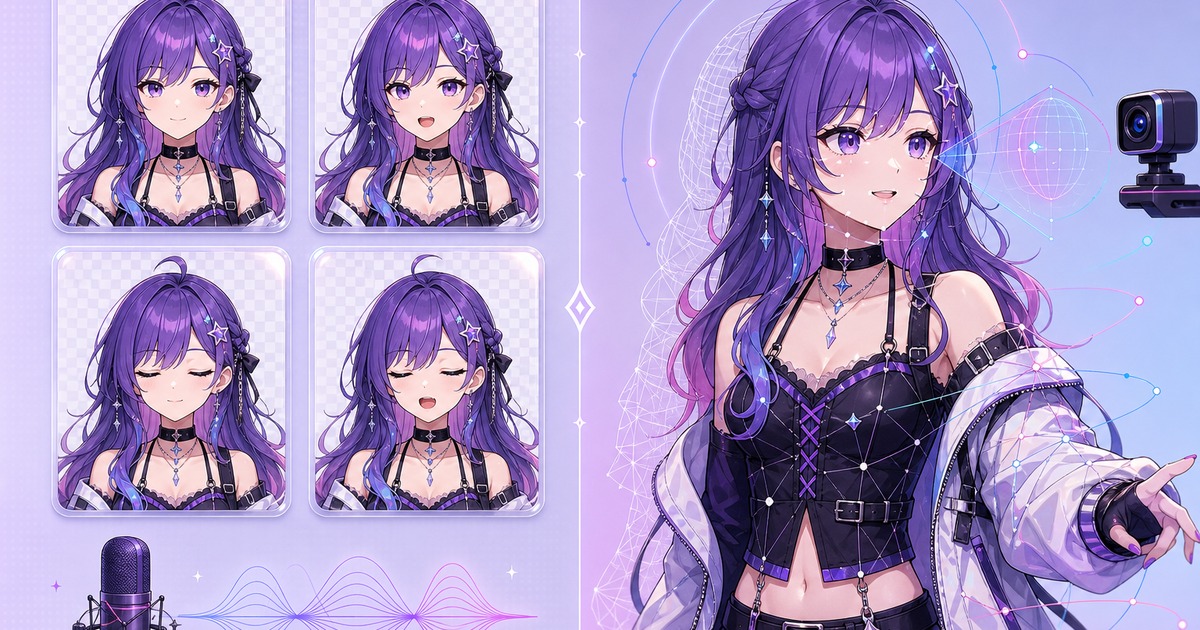
PNGTubers and tracked VTuber models solve the same basic problem: they let a creator appear on stream as a character instead of using a webcam. The difference is how the character moves and how much work the setup requires.
A PNGTuber switches between a small set of still images. A tracked VTuber model deforms or moves continuously in response to face and body tracking. Neither format is automatically better. The useful choice depends on the kind of stream you want to make.
PNGTuber vs VTuber at a glance
| Feature | PNGTuber | Tracked VTuber model |
|---|---|---|
| Character format | Two or more still images | Rigged 2D or 3D model |
| Basic input | Microphone activity | Camera or tracking device |
| Movement | State changes and simple effects | Continuous face, head or body motion |
| Setup time | Usually shorter | Usually longer |
| Hardware needs | Microphone and streaming computer | Tracking camera or compatible device plus streaming computer |
| Best fit | Fast launches, podcasts, casual streams and graphic character styles | Performance-focused streams and creators who want continuous motion |
What counts as a PNGTuber?
A PNGTuber is a reactive avatar made from static images. The simplest version has an idle image and a speaking image. A four-state model adds blinking while quiet and blinking while speaking.
The software listens to microphone activity and changes the visible image. Some apps can add bounce, tilt or transition effects, but the character is still based on discrete picture states rather than a continuously deforming rig.
If you want to see the four-state structure in detail, read What Is a PNGTuber? How to Make One for Free.
What people usually mean by VTuber
VTuber is a broad term for a creator represented by a virtual character. A PNGTuber can sit under that wider idea. In everyday comparisons, however, “VTuber model” usually means a rigged 2D or 3D avatar controlled by face, head or body tracking.
A 2D model is separated into drawable parts and rigged so the artwork can turn, blink, breathe and react to tracking data. A 3D model uses a three-dimensional skeleton and mesh. Both can produce smoother movement than a set of still images, but they require more asset preparation and calibration.
Movement and performance
A tracked model follows expressions and head movement more closely. That can matter for singing, acting, dance, close-up reactions and streams where the character’s physical performance is a large part of the show.
A PNGTuber has a different visual rhythm. Mouth and eye states snap or transition between drawings. That can look deliberate and expressive, especially for cartoon, comic and visual-novel-inspired channels. The limitation can become part of the style rather than something to hide.
Setup time and creative workload
A PNGTuber needs a small, consistent image set. The artist or maker must keep the crop, pose and costume aligned while changing the mouth and eyes. Once the images are ready, microphone setup is usually the main technical step.
A tracked model needs artwork or a 3D mesh prepared for movement, plus rigging, tracking calibration and software setup. The result can do more, but there are more parts to test. Hair, clothing, face angles and physics may all need adjustment.
If you want to start streaming soon, a PNG avatar is easier to iterate. You can test the character’s colors, silhouette and on-screen size before committing to a larger model project.
Computer and camera requirements
A basic PNGTuber reacts to audio, so it does not need a webcam for facial tracking. That helps creators who want a light setup, prefer not to use a camera, or need to preserve computer resources for a game and broadcast encoder.
A tracked VTuber model needs a source of tracking data. The exact requirement depends on the software and model format. It may use a webcam, phone camera or another tracking device. Model rendering and tracking also add work for the computer.
Do not choose based only on hardware specifications listed by somebody else. Test the full stack you plan to use: game, capture, avatar software, alerts and encoder.
Which format is easier to customize?
PNGTuber customization is direct. Draw or generate another state, outfit or emotion and add it to the image set. The downside is that every new pose may need matching speaking and blinking versions.
A rigged model can reuse its motion system across many expressions, but major clothing or hairstyle changes may require new artwork, mesh changes or rigging work. Small toggles can be convenient once somebody has built them properly.
Choose a PNGTuber if…
- You want to begin streaming quickly.
- You like a graphic, illustrated or visual-novel style.
- You mainly need idle, speaking and blinking reactions.
- You do not want camera-based face tracking.
- You are testing a character concept before investing more time.
- You need avatars for remote guests or a group voice show.
Choose a tracked VTuber model if…
- Continuous facial movement is central to the performance.
- You want head turns, body motion or more detailed expression tracking.
- You are ready to spend more time preparing and calibrating the model.
- Your computer and tracking hardware can run the complete stream reliably.
- You already know the character design you want to keep.
Can you start as a PNGTuber and upgrade later?
Yes. A PNG avatar is a practical prototype for a future rigged model. Streaming with it reveals whether the hairstyle reads at small size, whether the outfit blends into dark scenes, and which expressions you actually use.
Keep the character reference, palette and important costume details. A future artist or rigger can use that information when building a more complex version. You may also decide that the PNG format fits the channel and keep it permanently.
Make the simple version first
If you are undecided, start with four clean PNG states and test them in a real scene. The experiment is more useful than comparing feature lists without ever broadcasting.
The Free PNGTuber Maker creates idle, speaking and blinking states plus a Veadotube Mini project. You can try three character generations before an account is required.