
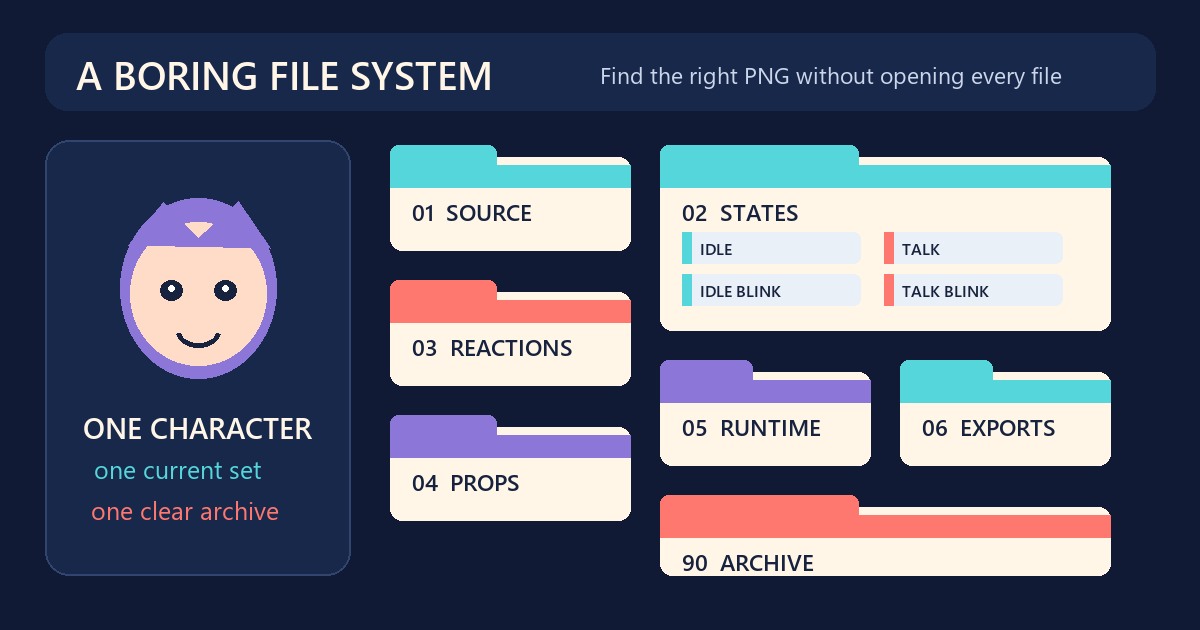
Most PNGTuber file problems start with a harmless name: idle-final.png. Then comes idle-final-2.png, followed by idle-final-REAL.png. A month later, nobody remembers which one is in the streaming app.
You do not need a complicated asset manager to fix this. A few folders, stable state names, and one clear rule for finished files are enough. The goal is practical: when you change a mouth, add a reaction, or move the setup to another computer, you should be able to find the right files without opening a dozen near-identical PNGs.
Start with one folder for the character
Keep one top-level folder for each character or model version. Do not mix two characters just because they appear on the same channel. Their states, props, and revision history will eventually diverge.
MothMage/
  01_source/
  02_states/
  03_reactions/
  04_props/
  05_runtime/
  06_exports/
  90_archive/
  99_backup-check/
The numbers keep the folders in a useful order on Windows, macOS, and cloud storage. The exact labels matter less than using the same ones every time. Google Drive’s official guidance also recommends short, meaningful names plus folders and subfolders. Its broader file organization guide is useful if you keep a copy of the project in Drive.
01_source holds editable art files and original exports. 02_states is the clean set used for normal talking and blinking. Reactions and transparent props get their own folders because they can grow without making the core states harder to scan. Put the runtime project in 05_runtime, and reserve 06_exports for packages you can actually import or share.
Name states by what they do
A file name should answer two questions: which character is this, and what state does it show? Names such as image1.png and happy.png do not answer enough. happy could mean an idle face, a talking face, or a full reaction set.
For a four-state model, use names like these:
mothmage_idle_eyes-open_mouth-closed.png
mothmage_talk_eyes-open_mouth-open.png
mothmage_idle_eyes-closed_mouth-closed.png
mothmage_talk_eyes-closed_mouth-open.png
That is longer than A, B, C, and D, but it remains understandable when a file is detached from its folder. If your current workflow already uses A/B/C/D, keep that order and add the function:
mothmage_A_talk.png
mothmage_B_idle.png
mothmage_C_talk-blink.png
mothmage_D_idle-blink.png
Do not swap the letters during a later revision. Stable names matter because your runtime may already point to those files. The four-state PNGTuber expression guide explains the eye and mouth combinations and gives you a checklist for keeping their canvas, crop, and pose consistent.
Keep reactions separate from speaking states
Core states switch constantly. Reactions are occasional. Keeping them in separate folders makes that difference obvious and reduces the chance of replacing a normal talking state with a one-off expression.
03_reactions/
  surprise/
    mothmage_surprise_idle.png
    mothmage_surprise_talk.png
  laugh/
    mothmage_laugh_idle.png
    mothmage_laugh_talk.png
Use the same suffixes for every reaction set. If one folder says talk, another says speaking, and a third says mouth-open, searches become less reliable. Pick one vocabulary and write it in a small README.txt inside the character folder.
Props need functional names too. mothmage_prop_mug-blue.png is easier to identify than cute-mug-final.png. Include a color or variant only when it distinguishes real alternatives.
Use versions for releases, not every edit
Adding v2 after every brush stroke creates noise. Save working history in the editable source file or your art program. Add a version to a complete, tested set instead:
06_exports/
  mothmage-v1.0-2026-09-18/
  mothmage-v1.1-2026-10-03/
The date is useful, but it should not be the only identifier. Version 1.1 tells you the second folder replaced 1.0; the date tells you when you packaged it. Inside each release folder, include the states, runtime project, any required props, and a short note describing what changed.
Keep the active files outside the archive. Once a release has passed your checks, copy the previous release into 90_archive and leave it alone. This is less clever than a web of shortcuts, but it is much harder to misunderstand during a rushed stream setup.
Separate a backup from an untested copy
A copied folder is only useful if you can recover from it. After making a backup, restore it into 99_backup-check or another temporary location. Open the runtime project, confirm that the intended avatar states load, and check that the PNG files still have transparency and matching dimensions.
This catches a common mistake: backing up the runtime project while leaving its linked images somewhere else. It also catches empty cloud placeholders that look present in a file browser but have not been downloaded to the computer.
When the restore test works, delete the temporary test copy and record the date in the release note. Keep at least one backup away from the working drive. Cloud storage can be one destination, but it does not replace the restore test.
A ten-minute cleanup for an existing PNGTuber
- Create the numbered folder structure without moving anything yet.
- Find the files your runtime currently uses and copy them into
02_states. - Rename the copies with one consistent state pattern.
- Point the runtime at the renamed files, then test idle, talking, and blinking.
- Move optional reactions and props only after the core set works.
- Package that tested setup as version
1.0and run one restore check.
Do not reorganize the source, rename every historical file, and rebuild the runtime at the same time. Get one tested current set working first. The archive can stay messy for another day.
The rule that keeps the system boring
There should be one obvious current set, one place for editable sources, and one archive for replaced releases. If two folders both look current, fix that before adding more art. A boring system works because the names keep telling the truth, even after you have forgotten why you made the files.
Need a fresh, consistent set to organize? Create four reactive states with the free PNGTuber maker, download the finished pack, then place that tested release into this folder structure.