
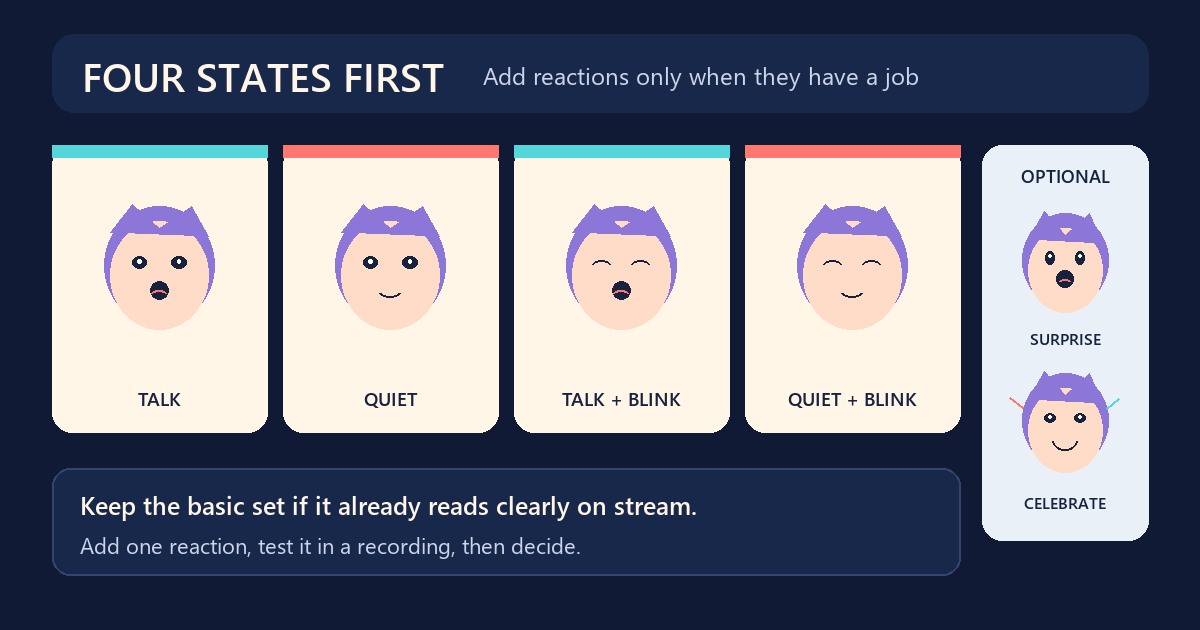
Four PNGTuber images are enough for a character that talks, rests, and blinks. They cover the two changes a basic reactive avatar needs: mouth open or closed, and eyes open or closed. Extra expressions become useful only when they communicate something the normal speaking loop cannot.
That distinction matters because “four images” and “four states” are often used as if they mean the same thing. In Veadotube Mini, one state can contain up to four image slots for the mouth-and-blink combinations. An avatar file can then hold multiple states, such as neutral, surprised, or annoyed. The current Veadotube Mini documentation, written for version 2.2 and updated March 19, 2026, confirms both parts of this setup.
What the basic four-image set already does
A complete basic set uses these combinations:
| Image | Eyes | Mouth | Job |
|---|---|---|---|
| A | Open | Open | Talking |
| B | Open | Closed | Quiet |
| C | Closed | Open | Talking during a blink |
| D | Closed | Closed | Quiet during a blink |
These images produce movement without changing the character’s emotion. The microphone controls the mouth, while blink timing controls the eyes. If the face, body, crop, and canvas stay aligned, the result reads as one character rather than a stack of drawings.
The four-image setup is enough for a first stream, regular conversation, gameplay, drawing sessions, and any format where the avatar mainly needs to show whether you are speaking. A two-image setup can also work if blinking is not important. Veadotube Mini can even react with one image by applying motion, although the visual feedback is more limited.
If you are still checking the eye-and-mouth combinations or the alignment between files, use the four-state PNGTuber expression sheet guide. Fix the core set before making reactions. Duplicating a misaligned base only creates the same problem several more times.
Add an expression when it has a job
An extra state should make a moment clearer or funnier. “I might use this someday” is not a strong reason. A repeatable cue is.
Surprise works well for reveals, sudden game events, or an unexpected chat message. A flat or tired expression can support a recurring deadpan response. Anger may fit a playful rant if that tone belongs to the channel. A celebratory state makes sense when wins, goals, or redeems happen often enough that you will remember to trigger it.
Start with one reaction you can name and use without thinking. Stream once or twice with it. If you never press the shortcut, the problem is probably not a lack of expressions. The reaction may be too subtle, the key may be awkward, or the moment may not occur often enough.
When four images are still enough
Stay with the basic set when you are learning your streaming software, testing a new character, or still changing the design. Every added emotion needs its own visual review and shortcut. More states also mean more files to organize and more chances to switch to the wrong one on stream.
Four images are also enough when the rest of the show carries the mood. Your voice, the game, scene changes, captions, and alerts already give viewers context. The avatar does not need to act out every sentence.
A restrained setup often reads better at normal stream size. Tiny eyebrow changes that look obvious in a full-resolution drawing may disappear once the avatar sits in a corner. Before adding a reaction, shrink it to its real on-screen size and compare it with neutral. If you cannot tell them apart immediately, strengthen the expression or skip it.
Build each extra emotion as a complete state
In Veadotube Mini, create another state rather than replacing one image inside the neutral speaking loop. The official guide says you can duplicate the current state with the plus control, replace its images, name it, and assign a shortcut. This keeps the neutral mouth-and-blink behavior together and gives the reaction its own settings.
For a polished emotional state, prepare the same four combinations as the neutral set. A surprised state, for example, needs quiet, talking, blinking, and talking-while-blinking images if you want it to behave exactly like neutral. You can use fewer slots when the reaction is deliberately brief or static, but test the result while speaking. A missing combination may be more noticeable than it was in the editor.
Keep the character’s scale, canvas, lighting, outfit details, and transparent padding fixed. Change the face, pose, or prop only as much as the reaction needs. If the whole body jumps sideways when the state changes, that is an alignment problem, not extra energy.
Choose a small reaction set
A practical first expansion is neutral plus one or two reactions. Pick them from moments that already happen on your stream:
- a brief surprise for reveals or sudden failures;
- a happy or celebratory state for wins and milestones;
- a deadpan state for a recurring joke or commentary beat.
You do not need all three. Two expressions that fit your timing are better than ten nearly identical faces. Avoid making separate states for emotions that viewers cannot distinguish at the final display size.
Name states by function rather than by filename history. “Neutral,” “Surprise,” and “Deadpan” are easier to scan than “New Face 2” or “Final Final.” The same rule helps with shortcuts: use a compact pattern you can remember, then check that those keys do not conflict with OBS, a game, push-to-talk, or chat controls.
Test reactions under stream conditions
Do a short private recording with the avatar at its normal size. Speak while entering and leaving each extra state. Check the mouth response, blink behavior, alignment, shortcut timing, and whether the reaction remains active longer than intended.
Veadotube Mini supports different shortcut behavior, including a while-pressed mode. That can suit a quick reaction because releasing the key ends it. A persistent emotional state may work better when you need both hands elsewhere, but you must remember to switch back. Choose the behavior around the scene, not around what looks tidy in the settings panel.
Watch the recording without focusing only on the avatar. If a reaction steals attention from every sentence, reduce how often you trigger it. If it passes unnoticed, simplify the face or make the silhouette change clearer. This playback check tells you more than adding another row to an expression sheet.
Create more states only after the basic set works
FreePNGTuber can create multiple emotion or pose sets from one saved character identity and package them together in a Veadotube Mini file. Use the PNGTuber maker when you need a consistent additional reaction rather than an unrelated redraw. Review every generated state at stream size before using it publicly.
The sensible stopping point is simple: keep four images when they already communicate the show, then add one expression with a clear cue. If that reaction earns its place during real streams, add the next one. If it does not, a larger state list will not fix it.